How to switch to a free yearly subscription from a monthly subscription
The new release of Dante Studio will have support for only yearly subscriptions (Dante Studio Essentials) Users with active Dante Studio monthly subscriptions are requested to switch to a free yearly subscription using the coupon code sent to you. To be able to enjoy the new features of Dante Studio, you are recommended to switch to the new version. Following are step by step instructions on how to switch to a free yearly subscription.
Step 1:
Open Dante Studio on a PC with an active subscription and access the Manage Subscription page, then click on ‘Manage Subscription’.
Step 2:
Selecting 'Manage Subscription' should open your Fast Spring subscription details on a web browser.On the Fast Spring Subscription page, click on ‘Manage’ and then ‘Cancel Subscription’
Note: If you have an Active Trial or Active Monthly subscriptions, cancel all the active subscriptions for the user as shown below.
The following image shows how to cancel monthly subscription:The following image shows how to cancel a currently Active Trial:
Step 3:
Upgrade to latest Dante Studio by double clicking the new .exe and going through the installation. You should be able to upgrade to latest Dante Studio and continue using the monthly subscription until it expires. Once cancelled, your subscriptions will not expire immediately but when your monthly period or your trial time expires.
Step 4:
When the current license expires, the following Dante Studio UI will show up. Press ‘Continue’ to buy the subscription
Step 5:
The payment screen appears on pressing continue. Enter the free coupon code and press apply to get a free yearly subscription. Click ‘Place your order’ to confirm:
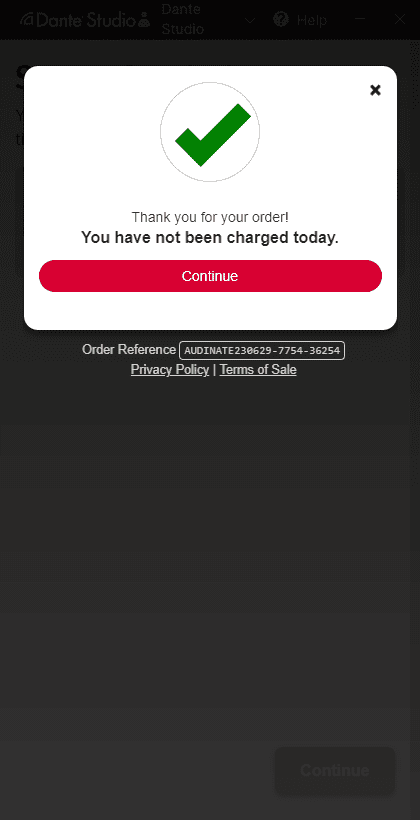
Step 6:
You will see the payment successful page:
Step 7:
On successful completion of payment you should that you have an active yearly subscription under the Manage Subscription section in Dante Studio:
Note: If you have multiple subscriptions on different PCs, you will need to repeat the steps on all of these computers. Please contact Audinate support for more coupons if needed.